Compared
Best photo cleaner apps for iPhone in 2026, compared
The best photo cleaner depends on what fills your library. For exact copies, the free Duplicates album in Photos is enough. To clean without paying, Clever Cleaner and Remo go furthest. PhotoCleanse, which we make, puts duplicate cleanup with three matching levels, swiping with a review pile and photo compression in one app for one listed price. Below, seven apps compared from their App Store listings.
Updated

Free plan every month
You confirm before deleting.
Quick pick
Which app fits which job
We make PhotoCleanse, so it’s listed first; weigh that. Every other line comes from the app’s US App Store listing on November 4, 2026. Price ranges mean the listing shows several prices for the same plan. The Cleanup, Swipewipe and Slidebox listings don’t say what you get without paying.
| App | Best for | Free use and US price |
|---|---|---|
| PhotoCleanse | Duplicates, Swipe and photo compression in one app | Free: 3 groups, 1 deck, 1 photo a month. Pro $5.99/week or $29.99/year |
| Apple Photos | Exact copies, for free | Free, built in |
| Clever Cleaner | Using a cleaner for free | Free: daily limits. $6.99/week or $39.99 once |
| Cleanup | Photos plus contacts, email and videos | $5.95–$11.99/week or $29.99/year |
| CleanMy®Phone | Sorting photos into AI categories | 3-day trial. $2.99–$7.99/month or $19.99–$39.99/year |
| Swipewipe | Swiping by month, with On This Day | $3.99–$9.99/week or $29.99/year |
| Slidebox | Sorting photos into albums while swiping | $4.99/month or $49.99/year |
| Remo | Duplicates only, free | Free, no in-app purchases listed |
Side by side
Tools side by side
“Duplicates” covers copies and similar shots. “Not listed” means the App Store description doesn’t mention it; the app may still do it.
| App | Duplicates | Swipe | Compress |
|---|---|---|---|
| PhotoCleanse | Yes, 3 matching levels | Yes, with a review pile | Photos |
| Clever Cleaner | Yes | Yes, no daily limit | Photos, videos |
| Cleanup | Yes | Not listed | Videos |
| CleanMy®Phone | Yes | Not listed | Videos |
| Swipewipe | Similar photos | Yes, by month | Not listed |
| Slidebox | Compare similar | Yes, plus albums | Not listed |
| Remo | Yes | Not listed | Not listed |
Our app
1. PhotoCleanse
Best for duplicates, swiping and photo compression in one place, with control over what counts as a match.
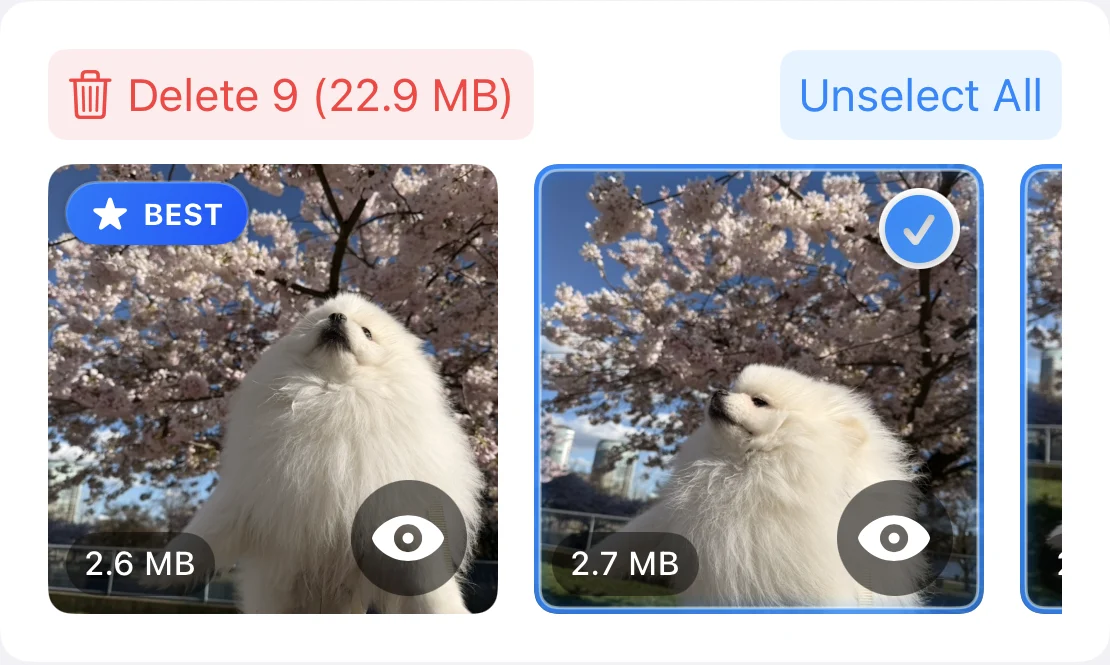
What it does. PhotoCleanse compares photo content on your iPhone and groups copies and similar shots. You choose how strict the matching is: Exact Matches, Balanced or More Matches. In each group it marks one BEST photo, picked from your favorites, pixel size, face quality, file size and date. It never selects your favorites on its own, and Select All Duplicates leaves each BEST photo and every favorite unselected. Swipe shows decks of up to 30 photos: left marks a photo, right keeps it, and nothing is deleted until you check the marked pile. Compress lists large photos with the space each would save and saves smaller copies with the quality and dimensions you pick.
Where it’s stronger. It’s the only app here whose listing offers a choice of matching strictness. It shows why the BEST photo was picked. It has one weekly and one yearly price ($5.99 and $29.99 in the US, both with a 3-day free trial for eligible new subscribers) rather than a list of price tests. It needs iOS 17, where Swipewipe needs iOS 18. Every delete goes through Apple Photos and the iOS confirmation, so deleted photos wait in Recently Deleted for 30 days, unless you’re over your iCloud storage limit, when Apple says they’re removed right away.
Where it’s weaker. It works on photos only, with no video, contact or email tools, and runs on iPhone only. The free plan is small: 3 duplicate-group cleanups, 1 Swipe deck and 1 compressed photo a month. It’s new and has no US ratings yet. Its App Privacy label lists data used to track you (purchases, identifiers and usage data, for ad measurement), like most apps here. Your photos aren’t uploaded.
Built in
2. Apple Photos: the free baseline
Best for exact copies, before you install anything.
Since iOS 16, Photos finds duplicate photos and videos and lists them in the Duplicates album under Utilities. Merge keeps one copy and moves the rest to Recently Deleted, and you can select every set and merge them at once. It doesn’t group similar shots or bursts, and it can take a while to appear after an update. If it covers your library, you don’t need a cleaner app.
How to delete duplicate photos on iPhone · Apple: Merge duplicate photos and videos
Free daily limits
3. Clever Cleaner
Best for cleaning without paying, if its daily limits fit your pace.
From CleverFiles, the maker of Disk Drill. Its listing describes duplicate and similar photo groups with a Best Shot, large videos sorted by size, screenshots, Live Photos converted to stills, compression for photos, videos and screenshots, and a Swipe mode with no daily limit. It says photos are processed on the device and deletions go to Recently Deleted.
Price. Free within daily limits; Premium is $6.99 a week with a 3-day trial or $39.99 once. Ratings: 4.8 from about 85,000 in the US. Runs on iOS 16 or later, and on Macs with Apple silicon. Its App Privacy label lists identifiers as data used to track you.
Most ratings
4. Cleanup: Phone Storage Cleaner
Best for cleaning photos, contacts and email from one app.
By Codeway (DEEP FLOW SOFTWARE SERVICES), and the most-rated cleaner here: 4.7 from about 754,000 in the US. Its listing covers duplicate photos and videos, similar photos with “Best” marked, screenshots, video compression, merging duplicate contacts, cleaning promotional email, a PIN-protected Secret Space, charging animations and widgets, with a review screen before anything is deleted.
Price. The listing shows nine weekly prices from $5.95 to $11.99 and $29.99 a year; it doesn’t say what is free. Runs on iOS 15 or later. Its App Privacy label lists purchases, identifiers and usage data as data used to track you, and email address and user ID as linked to you.
Formerly Gemini Photos
5. CleanMy®Phone
Best for browsing a library sorted into AI categories.
MacPaw’s cleaner, which replaced Gemini Photos in 2024. Its listing covers blurred photos, old screenshots, large videos, duplicates and similar shots, merging contacts, video compression, Live Photos to stills, and AI categories such as Travel, People, Pets, Food and Documents. It says it works fully on the device and lets you mark photos as Sensitive so they’re never included.
Price. A yearly subscription with a 3-day trial; the in-app list shows CleanMy®Phone at $7.99 a month or $36.99 a year, alongside older Gemini Photos plans from $2.99 a month to $39.99 a year. Ratings: 4.6 from about 23,000. Runs on iOS 17 or later.
What happened to Gemini Photos · CleanMy®Phone on the App Store
Swipe first
6. Swipewipe
Best for going through your library month by month.
By MWM, and the app that made swipe-to-delete popular. Its listing describes swiping right to keep and left to delete, month-by-month decks, On This Day with a widget and streaks, a photo map, AI enhancement of blurry photos, finding similar and blurry shots and screenshots, and bookmarking photos to decide later.
Price. The listing shows weekly prices from $3.99 to $9.99 and $29.99 a year. Ratings: 4.7 from about 101,000. Runs on iOS 18 or later, iPhone and iPad. Its App Privacy label lists identifiers, usage data and other data as used to track you.
Swipe to delete photos on iPhone · Swipewipe on the App Store
Swipe and file
7. Slidebox
Best for sorting photos into albums as you swipe.
Its listing describes deleting with a swipe, filing photos into albums with a tap, comparing similar photos side by side, favorites and undo, with changes syncing through the Photos app and iCloud.
Price. $4.99 a month or $49.99 a year, with no free trial, or a one-time purchase to unlock it; paid plans include cloud storage for albums. Ratings: 4.8 from about 17,000. Runs on iOS 15 or later. Its listing carries Apple’s Editors’ Choice badge. It’s the only app here whose App Privacy label lists Photos or Videos as collected (not linked to you); it lists no data used to track you.
Free, one job
8. Remo Duplicate Photos Remover
Best for a free duplicate finder with no extras.
Its listing describes finding exact and near-identical duplicates, keeping one best copy in each group automatically, marking and unmarking photos and previewing them with date, resolution and size before deleting. The listing is free with no in-app purchases shown, in English only, and its App Privacy label says the developer doesn’t collect any data. Ratings: 4.6 from about 14,000. Runs on iOS 15 or later.
Privacy labels
What each app’s App Privacy label says
Developers fill these in themselves, and Apple doesn’t verify them. Data an app processes only on your iPhone doesn’t count as collected, so “Photos or Videos” on a label means they leave the device.
| App | Data used to track you | Photos or videos collected |
|---|---|---|
| PhotoCleanse | Purchases, Identifiers, Usage Data | No |
| Clever Cleaner | Identifiers | No |
| Cleanup | Purchases, Identifiers, Usage Data | No |
| CleanMy®Phone | Identifiers, Usage Data | No |
| Swipewipe | Identifiers, Usage Data, Other Data | No |
| Slidebox | None listed | Yes, not linked to you |
| Remo | None: “does not collect any data” | No |
Source: each app’s App Privacy section on its US App Store page, November 4, 2026; Apple Developer, App privacy details on the App Store. More in are photo cleaner apps safe?
Before you subscribe
How to choose
- 01
Try the Duplicates album first
Open Photos, go to Utilities and tap Duplicates. If merging those sets frees enough space, stop there.
- 02
Match the app to what fills your library
Similar shots and bursts of the same moment: a duplicate finder with groups. Years of random photos: a swipe app. A few huge photos or videos: compression.
- 03
Check the price on the paywall
Weekly plans add up to several times a yearly one. Note the price and the day a trial ends, and cancel in Settings › your name › Subscriptions if you don’t keep it.
- 04
Check Recently Deleted before emptying it
Photos deleted on iPhone normally wait in Recently Deleted for 30 days. Apple says that if you’re over your iCloud storage limit, they’re removed right away, so back up before a big cleanup. Empty the album only when you’re sure.
More on the last step: Recently Deleted on iPhone.
Questions about photo cleaner apps
For help with the app, contact support
PhotoCleanse is made by Vlad.
What is the best photo cleaner app for iPhone?
It depends on the job. For exact copies, start with the free Duplicates album in Photos. To clean for free, Clever Cleaner’s daily limits and Remo’s free duplicate finder go furthest. For duplicates, swiping and photo compression in one app with one weekly and one yearly price, PhotoCleanse, which we make. For contacts and email too, Cleanup. For sorting into albums while you swipe, Slidebox.
Is there a free photo cleaner for iPhone?
Yes. The Photos app finds and merges exact duplicates for free on iOS 16 and later. Remo Duplicate Photos Remover is free with no in-app purchases listed. Clever Cleaner is free within daily limits. PhotoCleanse’s free plan covers 3 duplicate-group cleanups, 1 Swipe deck and 1 compressed photo a month.
Does Apple recommend a cleaner app?
Apple’s own tools are the Duplicates album in Photos, the recommendations in Settings › General › iPhone Storage, and Optimize iPhone Storage for iCloud Photos. On the App Store, Apple’s editors gave Slidebox an Editors’ Choice badge; none of the other apps here shows one in its US listing. A badge is an editorial pick and doesn’t vouch for an app’s claims.
Do photo cleaner apps upload my photos?
Check the App Privacy section on the App Store. Data an app processes only on your iPhone isn’t “collected” under Apple’s rules, so an app that lists Photos or Videos sends them off the device for some purpose. Of the apps here, only Slidebox lists Photos or Videos, as data not linked to you; its paid plans include cloud storage for albums.
Why do some apps show several prices for the same plan?
The In-App Purchases list on the App Store shows every price a developer has set up, often for price tests or offers. Cleanup lists nine weekly prices from $5.95 to $11.99 and Swipewipe several from $3.99 to $9.99. The price on the paywall is the one you pay, so read it before you tap.
Are photo cleaner apps safe?
A cleaner can only delete photos through the iOS confirmation, and deleted photos normally go to Recently Deleted for 30 days. Apple says that if you’re over your iCloud storage limit, they’re removed right away instead, so back up first. The bigger risks are trials that turn into weekly charges and apps that send data off the device. Our guide on whether photo cleaner apps are safe walks through six checks.
Did you test these apps?
No. This comparison comes from each app’s US App Store listing and description, checked on November 4, 2026: what the developer says the app does, its in-app purchase prices and its App Privacy label. Listings change, so check them before you subscribe. We make PhotoCleanse and describe it from our own product documentation.
Related guides

Try PhotoCleanse
on your iPhone
Duplicates, Swipe and compression in one app. Free to start.
For iPhone · Optional Pro subscription
Not for videos or Android phones: PhotoCleanse cleans up photos only.
Scan with your iPhone camera
Opens the App Store