Privacy and safety
Are photo cleaner apps safe on iPhone? Six checks before you install
A photo cleaner app is safe when it analyzes your photos on the iPhone instead of uploading them, lets you review everything before iOS asks you to confirm a deletion, and states its price plainly. You can check all three before you trust one: the App Privacy section on its App Store page, its privacy policy, the App Privacy Report in Settings, and its subscription terms. A duplicate finder needs access to your whole library, which Apple says includes hidden photos and location data, so these checks matter.
Updated

Photos are analyzed on your iPhone
You confirm before deleting.
At a glance
Six checks, and where to look
None of them needs a computer or a security tool. The first three take a minute on the App Store page, before you install anything. The App Privacy Report needs a day or two of use to show anything.
| Check, and where | Good sign | Warning sign |
|---|---|---|
| What the app can seeSettings › Privacy & Security › Photos | Explains why it needs full access | Also wants Contacts, Location or tracking |
| Whether photos leave the iPhoneApp Store page › App Privacy | Photos or Videos not listed | Photos or Videos listed as collected |
| What the privacy policy saysLinked from the App Store page | Photos analyzed on the device; services named | Vague, or rights to your content |
| Who the app talks toSettings › Privacy & Security › App Privacy Report | Domains that match the policy | Domains you can’t tie to anything |
| Who decides what is deletedInside the app | You review, then confirm in iOS | “Auto clean” with nothing to review |
| What you will payApp Store page and the paywall | Billed amount and period up front | A trial that renews into a weekly charge |
Sources: Apple, Photos & Privacy; Apple Support, About privacy information on the App Store and About App Privacy Report; Apple Developer, App privacy details on the App Store.
Check 1
What a cleaner app can see with Photos access
When an app asks for your photos, iOS offers a few levels. With Full Access, Apple says the app can reach all your photos and videos, including your hidden photos even if the Hidden album is locked, and their metadata, such as location. With Limited Access, you pick which photos and videos the app can see.
Here is the catch for cleaners. To find duplicates and similar shots, an app has to compare your whole library, so with Limited Access it sees only your picks and misses most copies. A cleaner that asks for full access is not suspicious for that alone; it is asking for the access its job needs. What should give you pause is an app that asks for more than the job: contacts, your location, or permission to track you across other companies’ apps.
A good app explains on its own screen why it wants full access before the iOS prompt appears. You can change the level at any time in Settings › Privacy & Security › Photos: tap the app, then choose another option.
Source: Apple, Photos & Privacy.
Check 2
Read the App Privacy section before you install
Every App Store page has an App Privacy section that sorts the data an app collects into Data Used to Track You, Data Linked to You and Data Not Linked to You. Tap See Details to see each data type. For a photo cleaner, the one that matters is Photos or Videos, which Apple’s definitions list under User Content as “the user’s photos or videos”.
Apple’s rules for developers say that data processed only on the device is not “collected” and does not need to be disclosed. An app that compares your photos on the iPhone therefore shouldn’t list Photos or Videos at all. If the label lists it, the developer is telling you that photos or videos leave the device; under Data Used to Track You, that they are combined with other companies’ data for advertising.
Expect to see other entries. Most free apps with subscriptions list purchases, usage data, identifiers or diagnostics for analytics, crash reports and ad measurement. That is common, and the policy should name the services behind it. Apple says the label is self-reported by the developer, so it is a statement to compare against the policy, not a certificate.
Sources: Apple Support, About privacy information on the App Store and the choices you have to control your data; Apple Developer, App privacy details on the App Store.
Check 3
What the privacy policy should say
The App Store page links to the developer’s privacy policy. For a photo cleaner, look for three things in it:
- Where photos are analyzed. A clear statement that analysis and any compression happen on your device and that photos aren’t uploaded. “We take your privacy seriously” is not that statement.
- Which services get what. The analytics, crash-reporting, subscription and advertising services the app uses, and what each one receives.
- How to opt out and get data deleted. Settings inside the app, the iOS tracking switch, and an address to write to.
If the label says photos stay on the device but the policy gives the developer rights to use your content, believe the policy and skip the app.
Check 4
See who the app talks to with App Privacy Report
Since iOS 15.2, the iPhone can log which apps used your photos, camera and other data, and which internet domains they contacted, over the past 7 days. Apple says the report is encrypted and stored only on your device.
- 01
Turn the report on
Open Settings › Privacy & Security, scroll down, tap App Privacy Report, then Turn On App Privacy Report. It records only from that moment.
- 02
Use the cleaner app as you normally would
Run a scan, look through the results, open the paywall if it has one. Give it a day so the report has something to show.
- 03
Open the app’s entry
Back in App Privacy Report, tap the app. Data & Sensor Access shows when it used Photos; App Network Activity lists every domain it contacted.
- 04
Match the domains to the policy
Analytics, crash-reporting, subscription and ad-measurement domains are normal for an app with a subscription. Domains you can’t tie to anything in the privacy policy are worth a question to the developer.
What the report can’t tell you: what was sent. A photo upload to a known service and a tiny analytics event look the same in a list of domains. Use it to compare against the label and the policy, not as proof either way. Source: Apple Support, About App Privacy Report.
Check 5
Who decides what gets deleted
A cleaner that deletes through Apple’s Photos framework can’t skip iOS: Apple’s developer documentation says that each time an app submits changes to the photo library, iOS shows an alert asking for your permission. Photos deleted that way go to Recently Deleted, where they stay for 30 days and can be recovered.
The safer apps add their own step before that alert: a screen that shows exactly which photos will be deleted, lets you unselect any of them, and doesn’t pre-select your favorites. Be wary of one-tap “auto clean” buttons that delete hundreds of photos you never saw.
Two cases skip the safety net, and they apply to any app, Photos included. Apple says photos you delete from a shared album are deleted immediately, and that when you are over your iCloud storage limit, deleted photos are removed right away instead of going to Recently Deleted. Back up first in either case.
Sources: Apple Developer, performChanges(_:completionHandler:); Apple Support, Delete photos on your iPhone or iPad and Manage your iCloud storage.
Check 6
Trials, weekly plans and how to get out
Most complaints about cleaner apps are about money, not privacy: a free trial that renews into a weekly charge the person didn’t notice. Before you start a trial, find the line on the paywall that states the billed amount and how often it is charged, and check the In-App Purchases list on the App Store page for the plans the app sells.
To cancel, open Settings, tap your name, tap Subscriptions, tap the subscription and tap Cancel Subscription. Apple says to cancel a trial at least 24 hours before it ends if you don’t want it to renew. If there is no Cancel button, or you see an expiration message in red, it is already canceled. Deleting the app does not cancel anything.
Charged by mistake? Sign in to reportaproblem.apple.com, choose I’d like to, then Request a refund, and pick the subscription. Apple says some purchases are eligible and the rules vary by country.
Sources: Apple Support, Cancel a subscription from Apple and how to request a refund.
Our own app, checked the same way
How PhotoCleanse answers these checks
We make PhotoCleanse, so read this as the developer’s account and check it yourself with the steps above.
- Access. PhotoCleanse asks for full access, after onboarding explains that duplicates are found across the whole library and that photos stay on the iPhone. If you choose Limited Access, it explains why full access finds more duplicates and points you to Settings.
- Where photos are analyzed. Duplicate and similar-photo checks run on the iPhone with Apple’s Vision framework, and compression runs there too. Photos aren’t uploaded.
- Who it talks to. Your App Privacy Report will show connections: Firebase for analytics and crash reports, HeyCatch for product analytics, RevenueCat for subscriptions, and ad measurement as described in our privacy policy. None of them receives photos, photo details or file names.
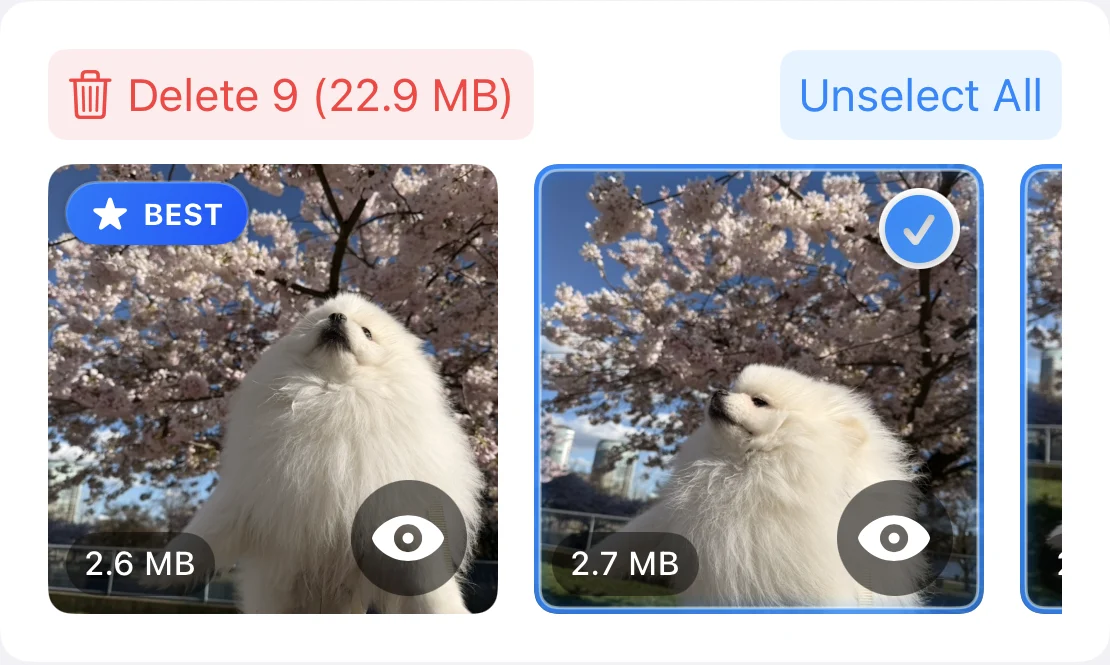
- Deleting. You choose the photos; favorites are never selected automatically, and the photo marked BEST in each group stays unselected when you select all duplicates. Every deletion goes through the iOS confirmation into Recently Deleted.
- Price. Free each month for 3 duplicate-group cleanups, 1 Swipe deck and 1 compressed photo. PhotoCleanse Pro is $5.99 a week or $29.99 a year in the US App Store, with a 3-day free trial for eligible new subscribers, and the paywall shows the billed amount and period as the main price.
How to delete duplicate photos on iPhone starts with Apple’s own Duplicates album, which needs no app at all.
Questions about photo cleaner app safety
For help with the app, contact support
PhotoCleanse is made by Vlad.
Do photo cleaner apps upload your photos?
Some do and some don’t, and you can’t tell from the app’s marketing. Look at the App Privacy section on its App Store page: Apple’s rules say data processed only on the device is not “collected” and need not be listed, so an app that sends your photos to a server should list Photos or Videos. The label is filled in by the developer, so read the privacy policy too.
Why does a duplicate cleaner want access to all my photos?
To find copies it has to compare every photo with every other one; with Limited Access it sees only the photos you picked, so it misses most duplicates. Apple says full access also covers your hidden photos, even when the Hidden album is locked, and metadata such as location. That is why the checks on this page matter more for cleaners than for most apps.
Can a cleaner app delete my photos without asking?
An app that changes your library through Apple’s Photos framework triggers an iOS alert asking your permission, so you see a system prompt before photos are deleted. Deleted photos then sit in Recently Deleted for 30 days. Two exceptions: photos deleted from a shared album are deleted immediately, and Apple says that if you are over your iCloud storage limit, deleted photos skip Recently Deleted.
Does Apple check the App Privacy labels?
Apple says the privacy information is self-reported by the developer, and it provides resources to help developers fill it in accurately. Treat the label as the developer’s own statement: useful, especially when it admits collecting something, but worth checking against the privacy policy and the App Privacy Report.
How do I stop a cleaner app from seeing my photos?
Open Settings › Privacy & Security › Photos, tap the app and choose None or Limited Access. Apple says you can change an app’s access to your photo library at any time. Deleting the app also removes its access.
How do I cancel a cleaner app’s free trial?
In Settings, tap your name, then Subscriptions, tap the app’s subscription and tap Cancel Subscription. Apple says to cancel at least 24 hours before the trial ends if you don’t want it to renew. Deleting the app does not cancel the subscription.
Is Apple’s Duplicates album safer than a cleaner app?
It involves no third party at all, so start there. The Photos app finds exact copies in the Duplicates album and merges them for you. It doesn’t group similar shots, and that is the gap most people install a cleaner app to fill.
Related guides

Try PhotoCleanse
on your iPhone
On-device duplicate checks, a review before every delete and a monthly free plan.
For iPhone · Optional Pro subscription
Not for videos or Android phones: PhotoCleanse cleans up photos only.
Scan with your iPhone camera
Opens the App Store